 Anil Computers 18/368, PREM KUTIR, UNIVERSITY ROAD, UDAIPUR - 313001RAJASTHAN, INDIA
 [email protected]@[email protected]
 09414234600, 7737447183
 Anil Computers 18/368, PREM KUTIR, UNIVERSITY ROAD, UDAIPUR - 313001RAJASTHAN, INDIA[email protected]@[email protected]09414234600, 7737447183

Comment
Word में document पढ़ते समय किसी निश्चित विषय की जानकारी मिल सके और लिखावट को समझने मे आसानी हो इसके लिए कॉमेंट insert किया जाता है।
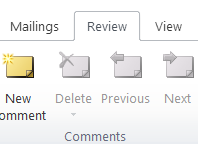
1. Comment insert करना
Text को सेलेक्ट करे जिस पर comment insert करना है।
Review Menu < New comment
Comment मे जो लिखना है type कर दे।
2. Comment delete करना :
Review Menu < Delete comment < Delete
English Blog
In MS Word, comments are inserted to provide information or feedback on a specific topic while reading a document.
They help in better understanding of the content and its context.
Select the text where you want to insert a comment.
Go to Review Menu → Click on New Comment
Type the desired message or note in the comment box.
Go to Review Menu → Click on Delete Comment → Then click Delete
Let me know if you’d like this formatted for a tutorial or training material.
Thanks To Google
Thanks To ChatGPT