 Anil Computers 18/368, PREM KUTIR, UNIVERSITY ROAD, UDAIPUR - 313001RAJASTHAN, INDIA
 [email protected]@[email protected]
 09414234600, 7737447183
 Anil Computers 18/368, PREM KUTIR, UNIVERSITY ROAD, UDAIPUR - 313001RAJASTHAN, INDIA[email protected]@[email protected]09414234600, 7737447183

New window
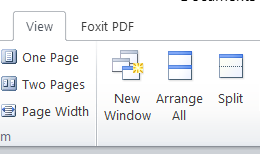
New window :- इस option पर क्लिक करने से document की copy बन जाती है।
Arrange All :- खुले हुए सभी डॉक्यूमेंट को एक ही स्क्रीन पर देखने के लिए इस ऑप्शन का उसे करते हैं।
Split :- इस ऑप्शन पर क्लिक करते ही एक बार खुलेगा उसकी जान रख कर क्लिक करेंगे वहां से फिर दो टुकड़ों में बैठ जाएगा।
Remove split :- इससे split को रिमूव किया जाता है।
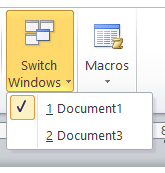
Switch window :- इस ऑप्शन से खुले हुए डॉक्यूमेंट में से एक से दूसरे में जा सकते हैं।
English Blog
New Window: Clicking on this option creates a duplicate (copy) of the current document.
This option is used to display all open documents side by side on the same screen.
Clicking on this option splits the current document window into two parts.
You can scroll and view different sections of the same document simultaneously.
This option removes the split view and returns the document to a single view.
This option allows you to switch between multiple open documents.
Thanks to Google
Thanks To ChatGPT