 Anil Computers 18/368, PREM KUTIR, UNIVERSITY ROAD, UDAIPUR - 313001RAJASTHAN, INDIA
 [email protected]@[email protected]
 09414234600, 7737447183
 Anil Computers 18/368, PREM KUTIR, UNIVERSITY ROAD, UDAIPUR - 313001RAJASTHAN, INDIA[email protected]@[email protected]09414234600, 7737447183

Envelopes
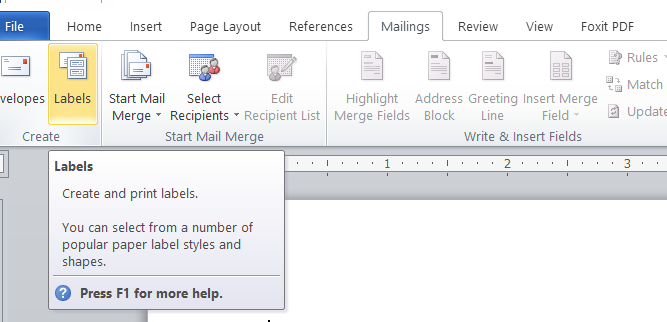
Mailing Bar पर जाएं और Create Bar के अंतर्गत Envelopes का Use करें।
Envelopes बनाने के लिए इस option का use करते है।
Mailings Menu < Envelopes
Step 2
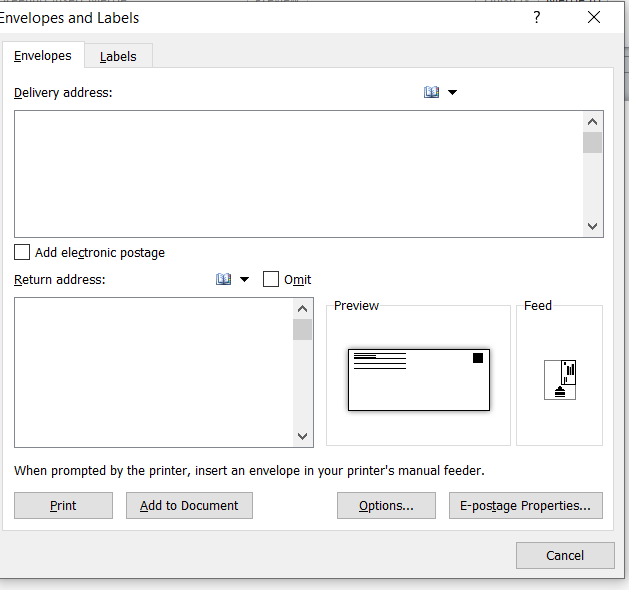
एक Dailog Box open होगा
Step 3
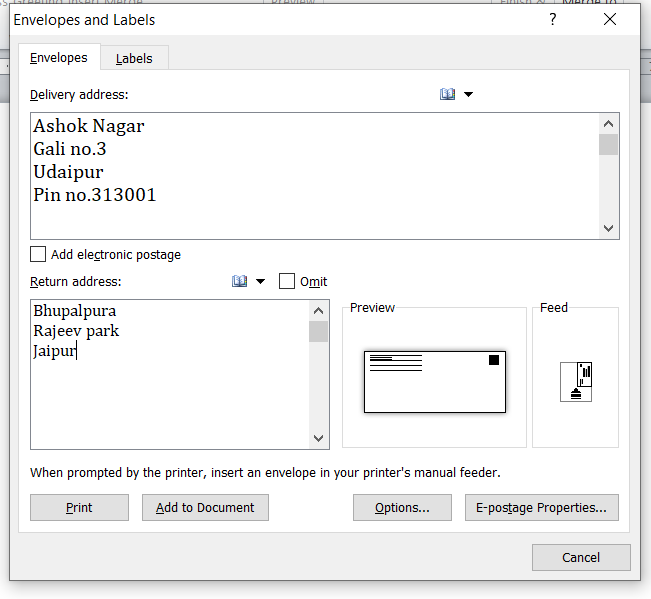
Delivery address And Return address Fill करें।
Add to document Option पर Click करें।
English Blog
To create envelopes, go to the Mailings tab and use the Envelopes option under the Create group.
Step 1:
Go to Mailings Menu → Envelopes
Step 2:
A dialog box will open.
Step 3:
Fill in the Delivery Address and Return Address.
Then click on the Add to Document option.
Thanks to Google
Thanks to ChatGPT