 Anil Computers 18/368, PREM KUTIR, UNIVERSITY ROAD, UDAIPUR - 313001RAJASTHAN, INDIA
 [email protected]@[email protected]
 09414234600, 7737447183
 Anil Computers 18/368, PREM KUTIR, UNIVERSITY ROAD, UDAIPUR - 313001RAJASTHAN, INDIA[email protected]@[email protected]09414234600, 7737447183
Caption
Insert Caption – (As a index)
यदि हमारे Document में हमने कोई Figure बनाई है या कोई Shape or Pic है तो उसका
Name add किया जा सकता है और Particular figure से realeted index तैयार किया
जाता है।
Select Figure > Insert Caption
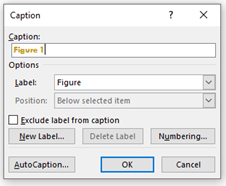
Figure1……….
यह Default ही रहता जो नाम हमें देना है इसी के आगे Name लिख दे।
¬ Lable – Figure
इसमें Figure, Chart, Table, Equation आदि lable होते हैं।
New lable से कोई नया lable भी बना सकते हैं।
अलग-अलग Figure को अलग-अलग नाम देने पर उसका Index तैयार किया जाता है।
_ Click on table of Figures :-
इस Option से तैयार किए गए Index से हम Particular Image के Page तक Move कर सकते हैं।
English Blog
If your document contains a figure, shape, or picture, you can add a name (caption) to it.
An index related to that figure can then be created.
Select the figure
Go to Insert Caption
Example:
Figure 1……….
→ This is the default format. You can type your desired name next to it.
There are default labels such as Figure, Chart, Table, Equation, etc.
You can also create a new label using the New Label option.
By giving different names to different figures, an index can be automatically generated.
Using this option, you can navigate directly to the page of a specific image or figure from the generated index.
Thanks To Google
Thanks To ChatGPT