 Anil Computers 18/368, PREM KUTIR, UNIVERSITY ROAD, UDAIPUR - 313001RAJASTHAN, INDIA
 [email protected]@[email protected]
 09414234600, 7737447183
 Anil Computers 18/368, PREM KUTIR, UNIVERSITY ROAD, UDAIPUR - 313001RAJASTHAN, INDIA[email protected]@[email protected]09414234600, 7737447183
CHOCOLATE EFFECT
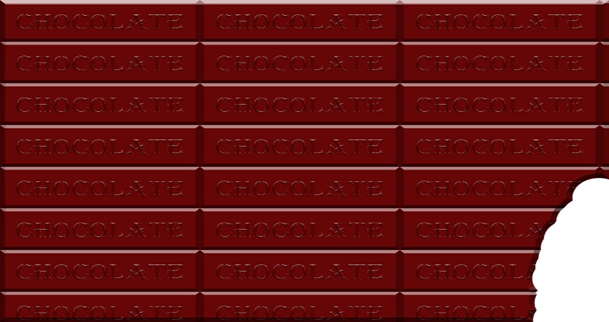
Create a Realistic Chocolate Effect in Photoshop
Want to add a delicious chocolate effect to your designs in Photoshop? This tutorial will guide you through creating a realistic chocolate look using color manipulation, texture, lighting, and shading techniques. Whether you're designing text, shapes, or backgrounds, this method will make your work look rich and mouth-watering.Creating a realistic Chocolate effect in Photoshop involves a combination of color manipulation , texture , lighting and shading.
नई फाइल बनाना
New File (Ctrl + N ) > 504 x 360 > Resolution : 72 > RGB Mode > White Color
Chocolate Base तैयार करना
New Layer > Foreground Color : Chocolate Like Color
Create Rectangle Selection > Fill Foreground Color (Alt+ Delete )
Layer Style > Bevel & Emboss… > Technique : Chisel Hard > Depth &Size Adjust
Ctrl + D ( Remove Selection )
Text लिखें
Text Tool > Type Chocolate ( Color will be same as chocolate ) > Move Tool se Rectangle pr Lena
Layer Style > Bevel & Emboss … > Technique : Chisel Soft > Depth& Size Adjust
Ctrl + T : Adjust Size
Ctrl + E : Merge
Pattern और Final Touch
Ctrl + Click on Layer Photo
Edit > Define Pattern > ok
Shift + F5 > Fill : Pattern > Chocolate > ok
And cut the corner by Eraser
By following these steps, you can create a realistic chocolate effect in Photoshop that enhances your text and designs. Experiment with different shades, depths, and textures to achieve the perfect chocolatey look.
? AI Tools & Technology Credits
इस लेख को आसान, स्पष्ट और उपयोगी बनाने के लिए आधुनिक AI तकनीकों की सहायता ली गई है।
इन टूल्स की मदद से रिसर्च, कंटेंट लेखन, डिजाइन, SEO और वीडियो क्रिएशन तेज़, सटीक और प्रोफेशनल तरीके से किया गया है।
हम इन सभी AI प्लेटफॉर्म्स का आभार व्यक्त करते हैं जिन्होंने सीखने और सिखाने की प्रक्रिया को सरल और प्रभावी बनाया।
यदि आप भी ब्लॉग, स्टडी नोट्स, प्रोजेक्ट या डिजिटल कंटेंट बनाना चाहते हैं, तो इन टूल्स का उपयोग अवश्य करें:
? OpenAI ChatGPT – AI Content Writing & Ideas
? Google Gemini – Smart Research Assistant
? Canva – Graphics & Design Creation
? Google Flow – AI Video Creation Tool
? InVideo – AI Video Maker & Reels Creator
? Ubersuggest – SEO & Keyword Research Tool
https://neilpatel.com/ubersuggest
? Remove.bg – Background Remover for Images
? ElevenLabs – AI Voiceover Generator
? Microsoft Copilot – Documents & Office Productivity AI
✨ AI tools के साथ सीखें, तेज़ी से बढ़ें और अपने काम को प्रोफेशनल बनाएं।
— Team Anil Computers