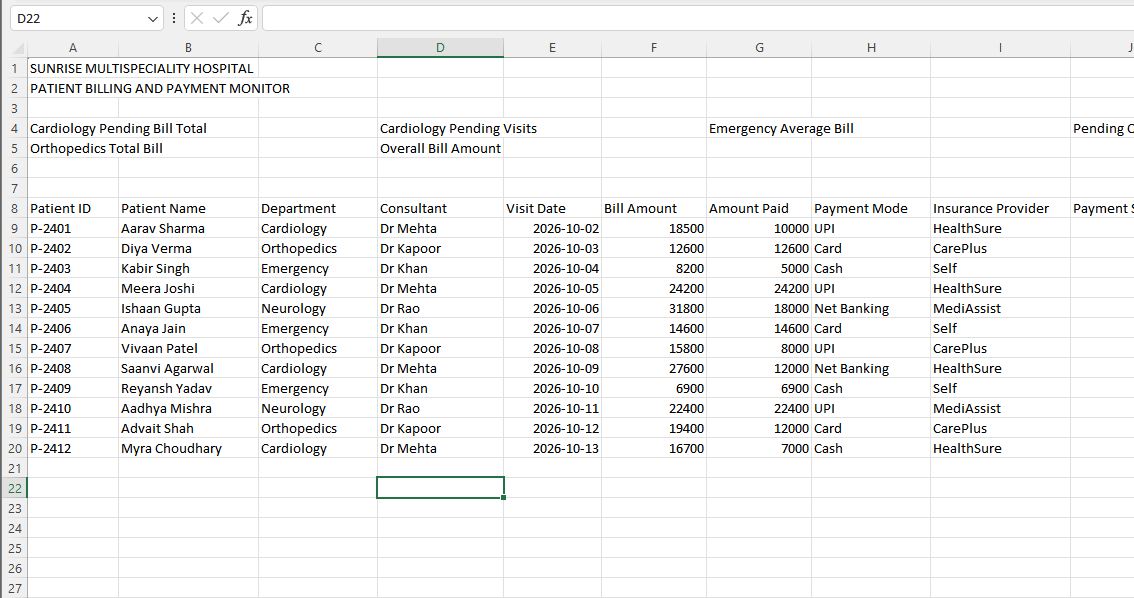
Excel Efficiency Test – Exercise 37


1. Merge and center the hospital title in cells A1:J1.
- सबसे पहले A1:J1 सेल को Select करें।
- Merge & Center पर क्लिक करें।
2. Merge the subtitle cells A2:J2.
- A2:J2 सेल को Select करें।
- Merge & Center पर क्लिक करें।
3. Apply bold formatting to the column headings in A8:J8.
4. Center align all column headings in A8:J8.
- Alignment में Center पर क्लिक करें।
5. Calculate Payment Status in J9:J20 using IF. Display 'Paid' when Bill Amount and Amount Paid are equal; otherwise display 'Pending'.
=IF(F9=G9,"Paid","Pending")
- Formula को J20 तक Drag करें।
6. Apply all borders to the patient billing table A8:J20.
- Borders के Dropdown पर क्लिक करें।
7. Calculate the total pending bill amount for the Cardiology department in B4 using SUMIFS.
=SUMIFS(F9:F20,C9:C20,"Cardiology",J9:J20,"Pending")
8. Count the pending Cardiology cases in E4 using COUNTIFS.
=COUNTIFS(C9:C20,"Cardiology",J9:J20,"Pending")
9. Calculate the average bill amount for the Emergency department in H4 using AVERAGEIF.
=AVERAGEIF(C9:C20,"Emergency",F9:F20)
10. Count the total number of Pending cases in K4 using COUNTIF.
=COUNTIF(J9:J20,"Pending")
11. Calculate the total bill amount for the Orthopedics department in B5 using SUMIF.
=SUMIF(C9:C20,"Orthopedics",F9:F20)
12. Calculate the overall Bill Amount in E5 using SUM.
=SUM(F9:F20)
13. Sort the complete patient records in A9:J20 by Bill Amount in ascending order.
- Sort by में Bill Amount चुनें।
- Order में Smallest to Largest चुनें।
14. Set the height of rows 9:20 to 23 points and set the page orientation to Landscape.
Row Height करने के लिए:
- Row 9 से 20 तक Select करें।
Landscape करने के लिए:
- Orientation पर क्लिक करें।
15. Apply a filter to the Department column and display only Cardiology records.
- Department वाले Column C के Dropdown पर क्लिक करें।
- Select All का Tick हटाएँ।
- केवल Cardiology पर Tick लगाएँ।
सभी Formula एक साथ याद करने के लिए
|
Question
|
Formula
|
|
5
|
=IF(F9=G9,"Paid","Pending")
|
|
7
|
=SUMIFS(F9:F20,C9:C20,"Cardiology",J9:J20,"Pending")
|
|
8
|
=COUNTIFS(C9:C20,"Cardiology",J9:J20,"Pending")
|
|
9
|
=AVERAGEIF(C9:C20,"Emergency",F9:F20)
|
|
10
|
=COUNTIF(J9:J20,"Pending")
|
|
11
|
=SUMIF(C9:C20,"Orthopedics",F9:F20)
|
|
12
|
=SUM(F9:F20)
|
Thanks To Google
Thanks To ChatGPT
AI Content Writing & Research Tools
OpenAI ChatGPT – AI Content Writing & Ideas
https://chat.openai.com
Google Google Gemini – Smart Research Assistant
https://gemini.google.com
Design & Graphics Tools
Canva – Graphics & Design Creation
https://www.canva.com
Adobe Adobe Firefly – AI Image & Design Generation
https://firefly.adobe.com
Remove.bg – Background Remover for Images
https://remove.bg
Video Creation & Editing Tools
Google Google Flow – AI Video Creation Tool
https://labs.google/flow
InVideo – AI Video Maker & Reels Creator
https://invideo.io
Pictory – Blog to Video Conversion
https://pictory.ai
Synthesia – AI Avatar Video Creation
https://www.synthesia.io
Runway ML – AI Video Editing & Effects
https://runwayml.com
CapCut – Short Video Editing
https://www.capcut.com
Voice & Audio Tools
ElevenLabs – AI Voiceover Generator
https://elevenlabs.io
Descript – Audio/Video Editing with AI
https://www.descript.com
SEO & Marketing Tools
Ubersuggest – SEO & Keyword Research Tool
https://neilpatel.com/ubersuggest
Productivity & Document Tools
Microsoft Microsoft Copilot – Documents & Office Productivity AI
https://copilot.microsoft.com
iLovePDF – PDF Edit, Convert & Merge Tool
https://www.ilovepdf.com/
Popular AI Platforms for Learning
Midjourney
https://www.midjourney.com
DALL·E
https://openai.com/dall-e
Leonardo AI
https://leonardo.ai
✨ AI tools के साथ सीखें, तेज़ी से बढ़ें और अपने काम को प्रोफेशनल बनाएं।
— Team Anil Computers