 Anil Computers 18/368, PREM KUTIR, UNIVERSITY ROAD, UDAIPUR - 313001RAJASTHAN, INDIA
 [email protected]@[email protected]
 09414234600, 7737447183
 Anil Computers 18/368, PREM KUTIR, UNIVERSITY ROAD, UDAIPUR - 313001RAJASTHAN, INDIA[email protected]@[email protected]09414234600, 7737447183

MS Word is a Word Processing Software developed by Microsoft. It is mainly used for creating letters, resumes, reports, thesis, certificates, notices, and projects.
There are several ways to open MS Word:
Double Click – Double-click the MS Word icon.
Right Click → Open – Right-click the icon and select Open.
Select & Enter – Select the icon and press Enter.
Run Command –
Press Windows + R.
Type WinWord → Click OK.
Start Menu – Start → All Programs → Microsoft Office → MS Word.
The File Menu contains important options used to create, save, print, protect, and manage documents.
Used to create a fresh document.
Shortcut: Ctrl + N
Used to open an already saved document.
Shortcut: Ctrl + O
Saves the current document.
Shortcut: Ctrl + S
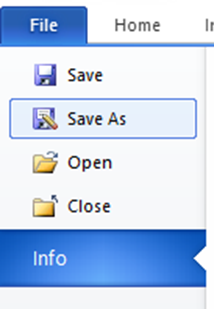
Used to save the existing document with a new name or in another format.
Prints the current page or document.
Shortcut: Ctrl + P
How to Cancel a Print Command
If you gave a print command by mistake, cancel it using these steps:
Click the Start button.
Open Devices & Printers.
Double-click the Default Printer.
Select “Cancel All Documents”.
Click Yes.
Used to close the currently open document.
Shows the list of documents that were recently opened or created.
You can add a password to protect your MS Word document.
Steps:
Go to File → Save As.
Click Tools → General Options.
Enter Password to Open (e.g., 123).
Enter Password to Modify (e.g., 123).
Re-enter the password → OK.
Click Save.
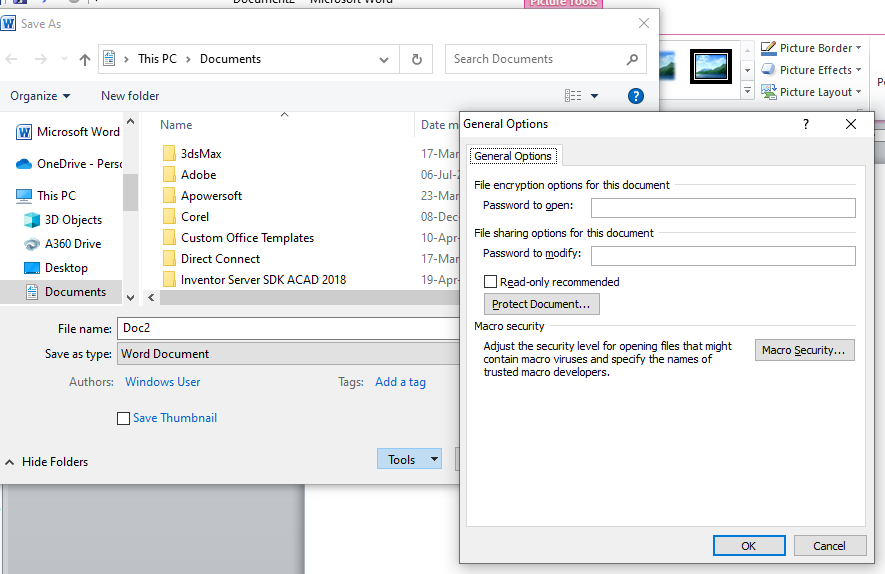
Now your document is password protected. Without the password, no one can open or modify it.
PDF = Portable Document Format
It is a file format developed by Adobe to present documents consistently across devices and platforms.
Fixed Layout – Same formatting on all devices.
Secure – Can be password-protected.
Mobile-Friendly – Easy to share via Email, WhatsApp, etc.
Print Ready – What you see is what you get.
Widely Used For – eBooks, certificates, resumes, invoices, admit cards, etc.
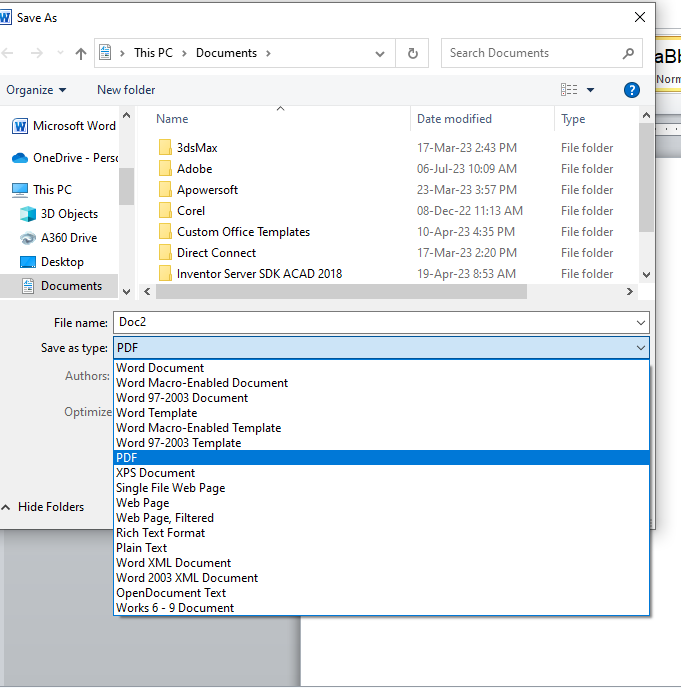
Go to File → Save As.
In “Save As Type” select PDF.
Click Save.
The File Menu in MS Word is one of the most essential features. From creating a new document to saving, printing, securing, and even converting into PDF – all major functions are performed from here.
MS Word makes it easy for students, professionals, and businesses to create professional documents with security and flexibility.
Thanks to Chatgpt
Thanks to google